ShopDreamUp AI ArtDreamUp
Deviation Actions


Suggested Deviants


Suggested Collections


You Might Like…


Description
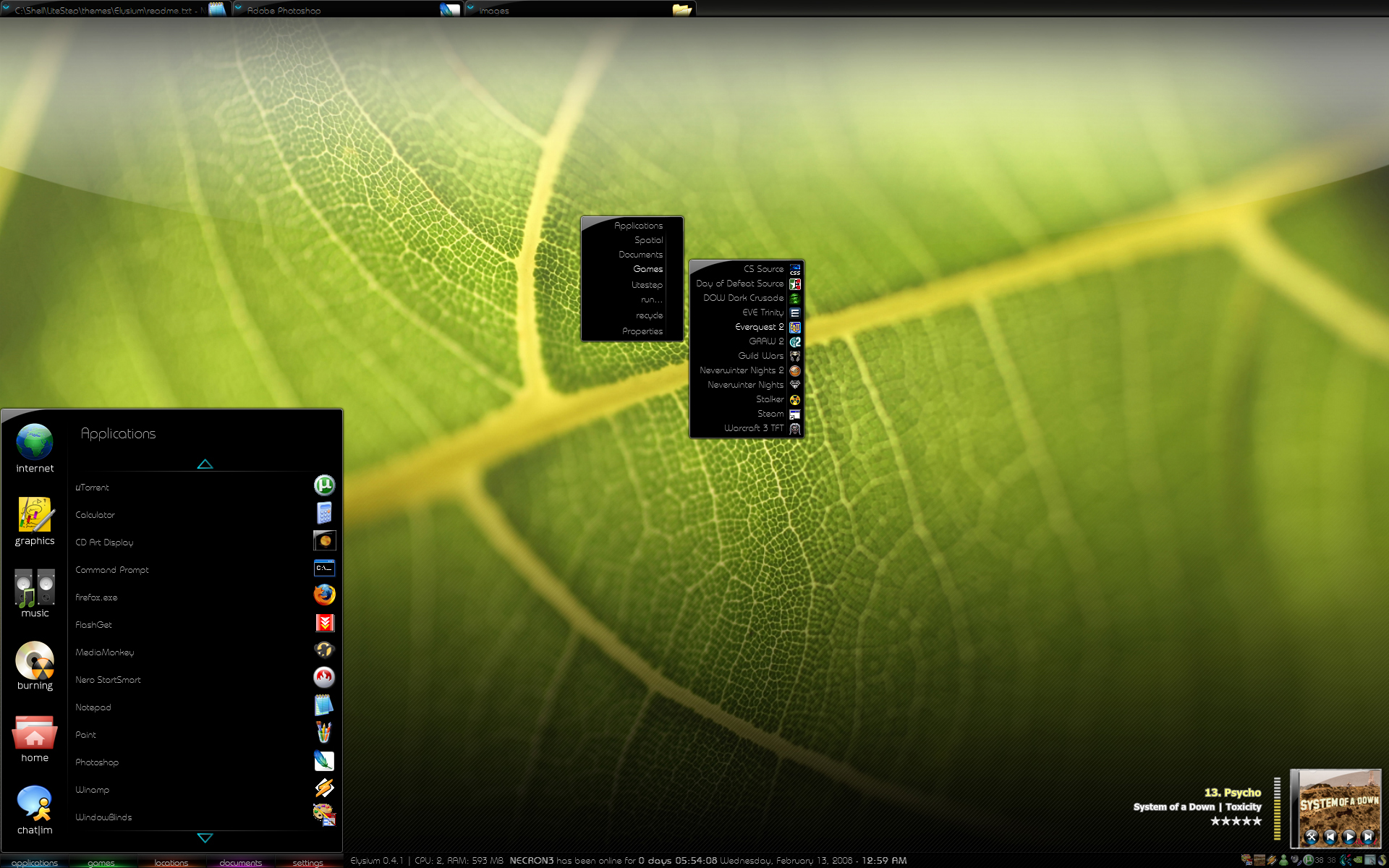
Elysium 0.4.1
Well, Elysium is what I think should be the ultimate in useability for any user interface.
It has been designed from the ground up to be intuitive. Tabs like firefox/ie7 for your open tasks,
contextual custom start menu's (more on that later) a system info area and slick graphics.
Its a pretty simple and self explanatory theme.
INSTALLATION
You MUST propogate the start menus. This is done by going to the theme folder and putting your own
working shortcuts into the STARTMENU folder's subfolders. This is essentially building your own start
menu.
Also, you MUST add an evar for litestep called "burning" for the burning button to work.
I think thats about it.
FEATURES
*autohiding taskbar. When not in use it will slide out of view
*Nearly every transition is smooth and alphafaded.
NOTE!!!!!!
This is an EARLY BETA of the LITESTEP THEME! it does NOT include the elysium windowblinds, which I
am still heavily developing.
FEATURES TO COME
-Winamp controls (though these will be toggled on/off as most people use cd cover art)
-Maybe desktop icons
-Whatever you suggest
Any suggestions for improvements please post them.
Hope you enjoy it!
-Ash
P.S. INSTALL THE FONT! (in misc folder)
PPS: All my works are OPEN SOURCE! that means you can edit, modify, and redistribute as you like WITHOUT my permission so long as you mention me as the original author!
Enjoy!
Well, Elysium is what I think should be the ultimate in useability for any user interface.
It has been designed from the ground up to be intuitive. Tabs like firefox/ie7 for your open tasks,
contextual custom start menu's (more on that later) a system info area and slick graphics.
Its a pretty simple and self explanatory theme.
INSTALLATION
You MUST propogate the start menus. This is done by going to the theme folder and putting your own
working shortcuts into the STARTMENU folder's subfolders. This is essentially building your own start
menu.
Also, you MUST add an evar for litestep called "burning" for the burning button to work.
I think thats about it.
FEATURES
*autohiding taskbar. When not in use it will slide out of view
*Nearly every transition is smooth and alphafaded.
NOTE!!!!!!
This is an EARLY BETA of the LITESTEP THEME! it does NOT include the elysium windowblinds, which I
am still heavily developing.
FEATURES TO COME
-Winamp controls (though these will be toggled on/off as most people use cd cover art)
-Maybe desktop icons
-Whatever you suggest
Any suggestions for improvements please post them.
Hope you enjoy it!
-Ash
P.S. INSTALL THE FONT! (in misc folder)
PPS: All my works are OPEN SOURCE! that means you can edit, modify, and redistribute as you like WITHOUT my permission so long as you mention me as the original author!
Enjoy!
Comments93
Join the community to add your comment. Already a deviant? Log In

wall plz?